Inspired by the NCX Group podcast episode EP 2 – Social Engineering Threats.
Most of the break-ins we clean up at A. Computer Doctor don’t start with a clever piece of code. They start with a phone call, a text or an email that convinces a real person to do something they shouldn’t: read a code aloud, click a link, approve a payment or let a “technician” connect to their computer. That’s the core of social engineering attacks, and in 2026 they are the most common way small businesses and families in Murrieta and Temecula lose money and data.
NCX Group covered this topic early in its podcast, and the basic lesson still holds: attackers go after people because people are easier to fool than firewalls. What has changed is how convincing the tricks have become. Here’s a plain-English look at how these scams work today and the simple habits that stop them.
Social engineering is manipulation. Instead of breaking through your security, the attacker talks their way past it by playing on trust, fear, urgency or helpfulness. The goal is usually one of three things: your login details, your money, or remote access to your devices. Because the victim takes the action, antivirus and spam filters often can’t catch it in time.
The most common forms we see locally include:
A few years ago, many scam emails were easy to spot because of poor spelling and odd wording. That clue is mostly gone. AI writing tools now produce polished messages in perfect English or Spanish, tailored with details pulled from LinkedIn, your website and social media. Voice cloning takes a short clip from a video or voicemail greeting and lets a scammer sound like your boss, your business partner or your grandchild.
We’re also seeing more MFA fatigue attacks, where a criminal who already has a password sends push notification after push notification until a tired user taps “Approve,” and more QR code phishing that hides a malicious link inside a flyer, a parking sign or a PDF invoice. Fake tech support pop-ups are also still common, especially among people still running Windows 10, which stopped receiving free security updates in October 2025 and makes a convenient story for scammers who claim your computer is “infected.”
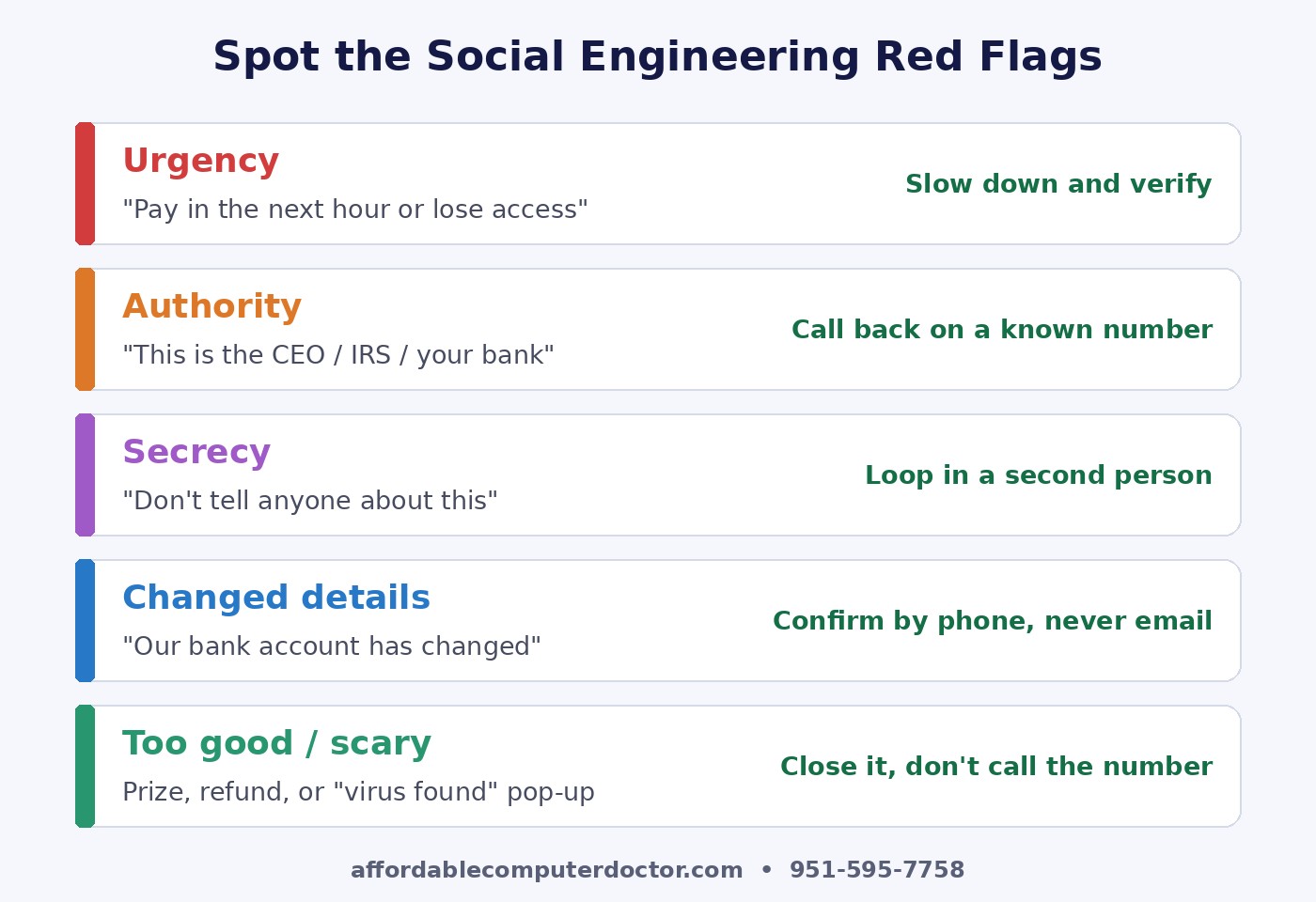
The technology behind the scams changes quickly, but the psychology barely changes at all. If you train yourself and your team to notice these pressure tactics, you’ll catch most attacks no matter how polished they look:
You don’t need an enterprise security team to shut down most social engineering attempts. These steps cost little or nothing and make a real difference:
Home users are targets too, and seniors in particular get a steady stream of fake bank, Medicare and tech support calls. A few habits help the whole household: agree on a family “safe word” to verify emergency calls, never let anyone remotely access a computer after an unsolicited call or pop-up, and hang up and call back using the number on the back of your card if “your bank” calls. If a pop-up says your computer is infected and lists a phone number, close the browser instead of calling. Legitimate companies don’t contact you that way.
Act quickly. Disconnect the affected computer from Wi-Fi, change the password for any account you entered on a suspicious site (from a different device), and call your bank right away if money or card details were involved. For businesses, let your IT provider know so they can review sign-ins, mail forwarding rules and remote access tools. You can also report fraud to the FBI’s Internet Crime Complaint Center at ic3.gov. The faster you respond, the more options you have.
A. Computer Doctor helps small businesses and home users in Murrieta, Temecula, Menifee, Wildomar and Lake Elsinore set up the protections that make social engineering harder: MFA, email filtering, password managers, backups and clear verification habits for your team. If you received something suspicious or want a friendly security check-up, call or text (951) 595-7758.
Credit: This article was inspired by the NCX Group podcast episode EP 2 – Social Engineering Threats (September 2017). The analysis and 2026 recommendations are our own.
